Search This Blog

February 25, 2013

IETester: Test multiple Internet Explorer versions


I got my new laptop recently and after I did the Windows Update, IE 9 appeared in my laptop. I wanted to keep IE 9, but I couldn't because our projects need to use IE 8 all the time.  It is easy to uninstall IE 9 and roll back to IE 8.

Go to Programs and Features.

Click View installed updates.

Right click Windows Internet Explorer 9 and you can uninstall it.

After rebooting machine, IE 8 is back.


If you would like to test web pages on multiple Internet Explorer versions at the same time, IETester is a good tool.


February 24, 2013

Data source name for Oracle 11g in Visual Studio is host name and service name

Before I worked on this project, I talked to my colleagues to provide the data source for Oracle 11g database because I wanted to use Visual Studio 2010 to connect to Oracle 11g and wrote a simple unit test.


They didn’t know what data source name looked like in Oracle 11g.  They showed me the configuration in Oracle SQL Developer. I talked to them: In SQL Server, you can use server name\instance name (ie. Test1\sst01) as a data source name. How about Oracle?  They felt so confused.

I can see host name and service name in Oracle SQL Developer. But what the data source name looks like in Oracle 11g ?

After several attempts, I found data source name = host name/ service name  and connection name can be anything else.

The interest part is that SQL Server uses “\”, but Oracle uses “/” as a data source name.

Next time if you like to connect to Oracle 11g via Visual Studio, you can try this way.

February 21, 2013

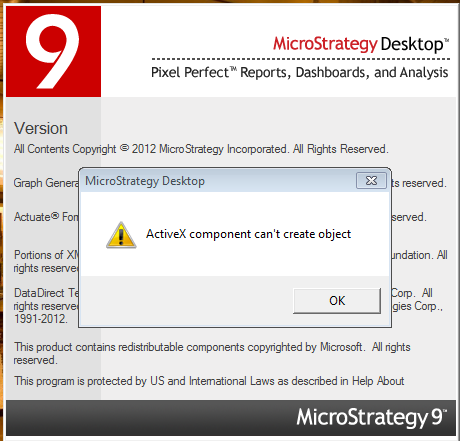
Fixed the MSTR Desktop issue-ActiveX component can't create object


Today I got a new laptop (Windows 7 x64) and I needed to install a lot of software to make my multiple projects work smoothly. After I installed MicroStrategy Desktop and double clicked desktop icon, I got the  following error : ActiveX component can't create object


After doing some research, it is easy to fix the issue via the following command lines.

cd \windows\syswow64
regsvr32 /u regobj.dll   
regsvr32 regobj.dll  

Next time if you have the same issue, this trick should work for you.

February 19, 2013

Use Telerik Test Studio to do MicroStrategy Web Test Automation successfully

Currently I am working on MicroStrategy Project where the authenticated users need to login to MicroStrategy Web report via their credentials and they can view Business Intelligence (BI) report and dashboard from our Oracle database 11g.  Therefore , the data accuracy is more important.

The current situation is that we need to create the report in MicroStrategy desktop and then compare the data visually between the desktop report and the web report. It is really time consuming. Our manager would like to know if it is possible to do MicroStrategy Web Test Automation.

That being said, I need to do the following things :

Get the value from Oracle 11g via Visual Studio 2010 (ODP.NET) based on SQL query

Login to MicroStrategy Web (Version 9.3) and view the report (http , https or proxy)

The value in each cell can be extracted.

Compare the values in DB and the ones in MicroStrategy web report

After several attempts, I find using Visual Studio Web Performance Test to extract the value in different cell from MicroStrategy Web report is not possible, but using Telerik Test Studio to extract the value is very easy.

The interesting part is that when I run my tests in Windows Server 2008 R2 SP1 machine using Internet Explorer 8, the report can't appear in MicroStrategy Web, but it is working fine in Chrome and Firefox. Therefore, I choose Chrome to run my automation in Windows Server 2008 R2 . I would say it is a MicroStrategy Product bug in IE 8 in Windows Server 2008 R2.

Next time if you would like to do MicroStrategy Web Test Automation, you can use Telerik Test Studio easily.

February 8, 2013

C# Unit Test: Put Negative Number in Bracket


Currently I use VSTS 2010 to write some unit tests to get the data from Oracle 11g and then do UI automation. I need to validate the value between the site and Oracle DB. However, the challenge part is that the value from DB has 3 or 4 decimal points, but the UI always shows 2 decimal points for numbers and 1 decimal point for percentage.

For example, I need to get the value from Oracle DB and then use percentage to display the value. If the value is negative such as -0.5%, the value needs to show (0.5%). 


Here is what I do:

Get the value from Oracle DB: “-0.005”

Convert string to double: -0.005

Format it to Percentage: "-0.5%"

If the value contains "-" sign, use ( ) to do the string format and then remove "-"

Get the value from the site and then compare the data between DB and the site.


I validate the data successfully. One interesting part is that the data is always correct in DB, but sometimes the value has the rounding error on the UI. I don’t feel surprised. 

January 23, 2013

Visual Studio 2012- Disable All Caps Menu


If you open Visual Studio 2012, you can see all-caps interface.  Do you like it?  If you don’t like it, you can disable it in registry key. 

Go to HKEY_CURRENT_USER\Software\Microsoft\VisualStudio\11.0\General\

Add a DWORD (32-bit ) value ( in my Windows Server 2008 R2 X64)


Enter SuppressUppercaseConversion and Enter 1


Open Visual Studio 2012 and all-caps menu is disabled.


January 7, 2013

TFS 2010 Continuous Integration Build: One check-in will trigger multiple builds.


In TFS 2010 Build Definition, if I use Continuous Integration build and the source controls folder points to TEST Project in 3 different build definitions (DEV, TEST, and Stage), every time after I make some changes in my TEST Project and check in the code, don’t feel surprised that 3 builds will be triggered automatically.


January 4, 2013

Good Strategy: Set up Multiple TFS Build Definitions for Multiple Environments


In order to fully use TFS Build Automation for our multiple environments, currently we set up 3 TFS Build Dentitions as follows.  


Branch & Environment
TFS Build Definition

DEV
Source Control Folder points to DEV Project in DEV environment
(Web.config and service reference points to DEV)

TEST
Source Control Folder points to DEV Project in TEST environment
(Web.config and service reference points to TEST)

STAGE
Source Control Folder points to DEV Project in STAGE environment
(Web.config and service reference points to STAGE)

PROD
We don’t set up definition in PROD because it is not allowed for us to do so.


In order to implement Unit Tests, WCF Tests, DB Tests and Coded Web Tests in TFS build definitions above, I need to create a TEST project that adds 3 different addresses (URLs) in service reference for multiple environments. I also need to add 3 Test lists called BVTDEV, BVTTEST and BVTSTAGE in Test List Editor and put required tests inside them separately.


Therefore, one TEST Project with different Test List is always available for all environments.

Branch & Environment
TFS build Definition

DEV
Source Control Folder points to DEV Project in DEV environment
Source Control Folder points to TEST Project in DEV environment
 (Test List to run: select BVTDEV)

TEST
Source Control Folder points to DEV Project in TEST environment
Source Control Folder points to TEST Project in TEST environment
(Test List to run: select BVTTEST)

STAGE
Source Control Folder points to DEV Project in STAGE environment
Source Control Folder points to TEST Project in STAGE environment
(Test List to run: select BVTSTAGE)

PROD
We don’t set up definition in PROD because it is not allowed for us to do so.


From our previous experience, when we push the code from DEV to TEST or from TEST to STAGE environment, DB changes always cause the issue and those BVTs can help us quickly capture if it is a good build or not.

I know some people would like to use 1 build definition for multiple environments. I don’t recommend it because different environment has different configuration and different service reference address. For TFS reporting, we can also know the build quality status for DEV /TEST / STAGE.

Setting up multiple TFS build definitions for multiple environments is a wonderful strategy for our current Silverlight 5 Project.

TFS 2010 Clone Build Definition


Last year I set up many TFS build dentitions for different environments (DEV, TEST and STAGE). When setting up different build dentition, I found TFS 2010 doesn't natively provide the feature of Clone Build Definition and it was really time consuming to set them up individually.

On Nov 26, 2012, I wrote a post entitled Fix the issue of Internal Error in Changeset in TFS 2010 . After installing TFS powerful tools 2011, the feature of Clone Build Definition appears in TFS 2010.


It is good news for me because I can clone many build definitions I want.


January 3, 2013

Silverlight does not support GIF images

Recently our tester tested one scenario in Silverlight 5: after uploading JPG, PNG, BMP or GIF file, the GIF/ BMP image didn’t appear in Silverlight 5 Application. Therefore, she logged the bug.

I told her that Silverlight does not natively support GIF image.  Our developer would like to fix the bug for displaying BMP image in Silverlight 5.