Search This Blog

July 30, 2013

QA Release Notes: Just Write What Matters to Your Target Audience

This year our QA manager talked to every QA member: One day before Production Release, we need to send out QA Release Notes to Support Team, Project Stakeholders and some Managers. I like this procedure because testers in different project may not know what others are doing in another project. From release notes, they can learn something new.

In the beginning, I thought I needed to write something about system requirement, bug fixes, bug description and the workaround in the release notes.  Finally I find it really depends on the team culture. Most importantly, if you know who your target audience is, just write what matters to them.

Release notes can be for either internal or external use.  For external users, system requirements, bug fixes, bug descriptions and the workaround need to be included.

System Requirement

What bugs we fixed?

What’s the workaround for bug fixes?

For internal users such as our support team, project stakeholders, managers and team members, they don’t care about them. From our perspective, they only care about

Project Name

Release Sprint

Release Date

New features

Total defects by area path (Use Pivot Chart)

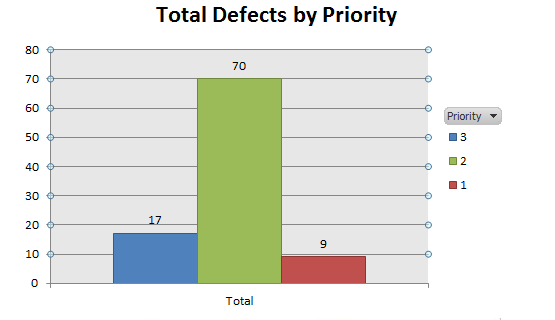
Total defects by priority (Use Pivot Chart)

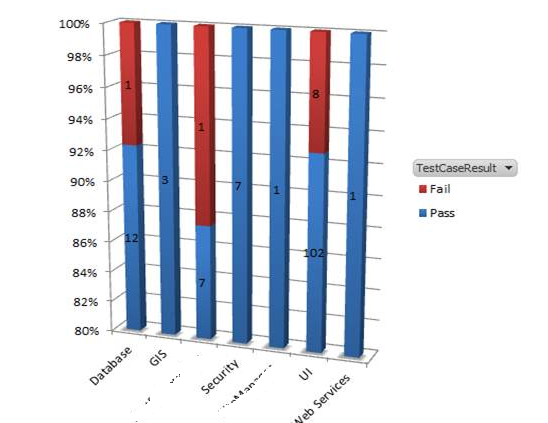
Total Test cases pass and fail (Use Pivot Chart)

Caveats

Going forward


If you know who your target audience is, you will know that there is no standard template of release notes. You can create it by yourself at any time and just write what matters to them.

July 24, 2013

OBIEE 10g Performance Testing: Tests without Indexes Run Faster

2 months ago, I worked with our BI team developers to do OBIEE 10g performance testing.  I asked them: what’s the scenario you would like to achieve?  They told me the following scenarios:

·         They provided 10+ dashboard & reports for me

·         They would like to measure the response time of a single user to login to OBIEE and view dashboard & reports successfully. Therefore, 10 + dashboard & reports meant 10+ different users.

·         The test result determined if the tests in OBIEE 10g with indexes or without indexes ran faster or not.

Since the scenarios were very straightforward, I used Visual Studio 2010 to create web performance tests to meet their needs. I also asked them: would you like to do load test that simulated concurrent users to login to OBIEE?  They said no.  That was for another project.  

Prerequisite:

·         They needed to create test users (20 users).

·         20 users had the permission to login to OBIEE to view dashboard & reports successfully.

·         Cleared user’s caches or turned off user sessions before running my web tests

·         Prepared for the scripts of adding or dropping indexes in the related tables in Oracle 10g.

Created Tests:

·         I used Visual Studio 2010 to create web performance tests to login to OBIEE and view the dashboard & reports they provided ( 13 tests for 13 users )

·         When creating tests, it took me much longer (didn’t know how much time) to see the data showing up in dashboard completely. Therefore I used for loop for the specific WebTestRequest (I set Baseline 5 times and I adjusted it at any time if tests failed)

·         Validated if data was really showing up after dashboard & reports were completely loaded.

Ran the tests with indexes:

When running 13 tests in serialization, some tests failed because it took a lot of time to load the report completely and validation failed.  After talking to BI developers, they investigated some SQL queries and found it was really slow to get the data back.  Therefore I changed for loop from 5 times to 10 times. This time all tests passed.


Ran the tests without indexes:

When running 13 tests in serialization, all tests passed compared to the tests with indexes.


Conclusion: Tests without indexes run faster than tests with indexes in our Oracle 10g platform.

Decision:  They decided to use OBIEE 10 g without indexes in their next release.  

Current situation: I asked one of our BI developers: is OBIEE 10g without indexes running very smoothly? He said: pretty good and it has been running smoothly since last release.

July 21, 2013

Fixed the issue in Google Chrome: Error 105 (net::ERR_NAME_NOT_RESOLVED) : Unable to resolve the server's DNS address

Some days ago, when I used Google Chrome to hit some URLs I am surfing often, I got the following error intermittently: 

Error 105 (net:: ERR_NAME_NOT_RESOLVED):  Unable to resolve the server's DNS address

In the beginning, I thought it could be the issue of proxy setting or a computer virus in my laptop. I talked to my wife and she said that she had seen this issue in her laptop for many days.  Interesting!

I decided to use the system image I created earlier to recover my computer to see what’s going on. After system image and hitting the URLs via Chrome, the following screenshot appeared.


I tried 1, 3, 4, 5, 6 already, but I didn’t try restarting my router and modem. After restarting my router and modem, we haven’t seen this issue any more.

Next time if you have the same issue -Error 105 (net::ERR_NAME_NOT_RESOLVED) ,  you can use this screenshot for your reference. The Error 105 issue should be resolved.

July 18, 2013

Bing Map Service is obsolete: My home address can not be found.

My Real Estate broker searched my home address (new address 5 years ago) via NWMLS in Washington State. The interesting part is that he couldn’t find it and he felt so surprised.

I showed him Redfin App in my iPhone 5 and he used NWMLS # to search it. This time my home address in NWMLS appeared. But the address is still old. 5 years ago!

I don’t feel surprised because NWMLS is using Bing Map Service. But Redfin is using Google Map Service.

Many new houses were built in WA in these 5 years and I can’t believe Bing map service has not been updated.  In this case, Bing Map Service is really obsolete.

June 5, 2013

Load Test: Mimic multiple users to login to Silverlight Application

I use my work laptop to hit our Silverlight Application via my credential automatically. Therefore, I cannot see the Windows Authentication popup. 

If I would like to mimic multiple test users to login to Silverlight Application via different credential, how can I do that? It is pretty easy.

Open IE-> Internet Options-> Security-> Custom Levels -> Check Prompt for user name and password inside User Authentication.


Put 20 different usernames with passwords in the file.  

Open Visual studio IDE.

Create a new web performance test that can randomly pick up the different user to login to Silverlight Application.  

Create a Load test that adds this web performance test.

Run the load test and you are all set.

May 24, 2013

Fixed the issue: Background Color in Different Browsers

My wife is the graphic designer. 2 days ago, she told me to take a look at her company website after she updated it.

The interesting part was that when I used chrome to view it, the color was fluorescent green as follows: 


When she used iPhone 5 to view it, it was the same as above.

When she used IE9 and Safari, the color is lime green and it is the expected result.  


I talked to her: is this image a JPG file when you design it in Adobe Photoshop? She said: Yes.

After looking into this issue, she changed JPG to PNG and updated the site.  It works the same in different browsers. 

May 13, 2013

Fixed the issue- Burn Down Chart shows reporting service error.

Today when I came to the office and looked at our project dashboard, the burn down chart showed the reporting service error. Besides, the burn down chart was not sent to the people who subscribe on the daily basis. I don’t have permission to login to  TFS server and I talked to my manager about this issue.

After looking into the issue, we found out SSAS service stopped for some reason. After restarting SSAS, everything is back to normal.

April 30, 2013

Fix the PDF issue: A-PDF Password Security can make Print enabled easily


Today I downloaded one useful PDF file online and I would like to print some pages. I noticed that print function was disabled.


I spent some minutes looking for a useful tool that can enable Print function.


After installing A-PDF Password Security, I can make Print enabled easily.

April 28, 2013

Fix the issue: Sound is not working in Chrome


Yesterday when I used Chrome to watch videos on YouTube, there was no sound in my laptop. After looking into this issue, there is no issue with my sound card because I can still use IE9 to watch videos with the clear sound. What happened to Chrome? Finally, I find the main issue is from Shockware Flash.

How to fix the sound issue in Chrome?

Go to Chrome Plugins

Disable Shockware Flash (11.7.700.179)

Close Chrome

Go to YouTube again

Click the video and it can lead you to install the version (11.7.700.169)


After that, sound is working in Chrome.

April 12, 2013

Fixed the issue: The HTTP request is unauthorized with client authentication scheme 'Anonymous'. The authentication header received from the server was 'NTLM'


Today, I wrote a unit test to consume one web service method and I got the following error.

The HTTP request is unauthorized with client authentication scheme 'Anonymous'. The authentication header received from the server was 'NTLM'.

After looking into this issue, in app.config , it uses security mode =None and clientCredentialType =None.

<security mode="None">
<transport clientCredentialType="None" proxyCredentialType="None" realm="" />
<message clientCredentialType="UserName" algorithmSuite="Default" />
</security>


After using the following code, everything is working perfectly.

<security mode="TransportCredentialOnly">
<transport clientCredentialType="Ntlm" proxyCredentialType="None" realm="" />
<message clientCredentialType="UserName" algorithmSuite="Default" />
</security>