Search This Blog

June 25, 2014

Fixed the issue: Integration test failed due to curly quotes

Last week, when doing integration test with another team member, he mentioned that one row in the inbound table showed the invalid character. After looking into this interesting issue in our DB, here is the screenshot.

How could this issue happen?

If users are typing apostrophe in MS Word or Outlook, it shows the first one above (Curly quote or Smart quote) by default.

If they copy and paste into the system, after we publish the data, the integration test fails due to invalid characters (the second one above)

How to turn off Smart quote and use Straight quotes in MS word? Here are the steps:

Open MS Word 2010 -> File-Options-Proofing-> AutoCorrect Options->AutoFormat As You Type-> Uncheck Straight quotes with smart quotes.


Usually users won't do it in this way. The best way is that we need to validate the data with Curly quote often in the DB.

April 18, 2014

Fixed the issue: Could not start build: You are not authorized to access

This morning, our team members could not queue a new build successfully. We got the following error message. But we can still hit the following URL successfully.


Go to security setting in TFS 2013 Dashboard  and I don’t see any issue at all.

After logging to build machine and restarting the related build services, I got the logon failure .It means the password of TFS build account was expired.

This error message “You are not authorized to access” is really confusing and Microsoft needs to provide the better error message to handle this scenario.

After updating the new password of TFS build account , queuing a new build is always successful. 

April 1, 2014

TFS 2013 Dashboard: Users can’t export work items to MS Excel ( bad design)

Today one colleague would like to export work items to MS Excel in TFS 2013 dashboard and he could not find it. I could not find it, either. It was working in TFS 2010 web access. I only see one option: Send query as an email. 


After posting a question in MSDN forum, I finally notice this feature was removed in TFS 2012.

The company pays so much money to let users use TFS 2013 enterprise version and finally they can’t use the basic function of exporting work items to MS Excel.  What should they do?

I would say it is bad design and not user friendly. 

March 21, 2014

SQL Query: Get the correct Fiscal Year and Quarter

Today I need to compare the data accuracy between 2 tables in SQL Server 2008 R2. There is one interesting scenario of Fiscal Year and Quarter for me to validate. The first quarter of a fiscal year starts on October 1 every year.  

For example,

Q4 (FY 2013): July –September, 2013

Q1 (FY 2014): October -December, 2013

Q2 (FY2014):  January –March, 2014

Q3 (FY2014):  April –June, 2014

Q4 (FY2014):  July –September, 2014

Actually, we can use datapart and case when  in SQL query easily.


After that, here is the expected result. 


March 19, 2014

Fixed the issue: Invalid Column Name appears in SQL Server Management Studio

Today I used SSMS to select  new columns in SQL query and  it showed invalid column Name ‘XXXXX’.  But running the query has no issue at all.


After looking into this interesting issue, it is easy to fix it.


Just click Edit-> Intellisense-> Refresh Local Cache and  you are all set. 

February 26, 2014

Fixed the issue: Visual Studio 2012 IDE shows the error – Object reference not set to an instance of an object.

I have Visual Studio 2013 IDE and Visual Studio 2012 IDE installed in my work laptop.

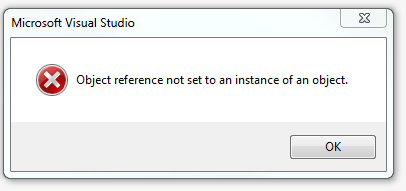
Today when I used Visual Studio 2012 IDE to open one solution file, for some reason, all files were not showing up in Solution Explorer. I used File-Open ->Project/Solution to open the solution file, it showed the error- Object reference not set to an instance of an object.


What happened with Visual Studio 2012?  It must be one line code in Visual Studio 2012 that can’t handle very well and throw the error.  Visual Studio 2013 is working fine.

After looking into this issue, after I deleted all files in the following folder, opening solution file has no issue at all.

%USERPROFILE%\AppData\Local\Microsoft\VisualStudio\11.0

February 21, 2014

Fixed the issue: LOAD TEST menu doesn’t appear in Visual Studio 2013

Today I opened one solution file via Visual Studio 2013 and noticed one interesting issue: LOAD TEST Menu doesn't appear in Visual Studio 2013, but it appears in another solution file.

After looking into this issue , I found out the difference between these 2 .csproj files.


Just add this missing  WebTest Project Type in the solution file, reopen it, and LOAD TEST menu appears again.


February 13, 2014

Fixed the issue: Some tests failed in TFS 2013 build due to the Error Code: 502 Proxy Error: The ISA Server denied the specified Uniform Resource Locator

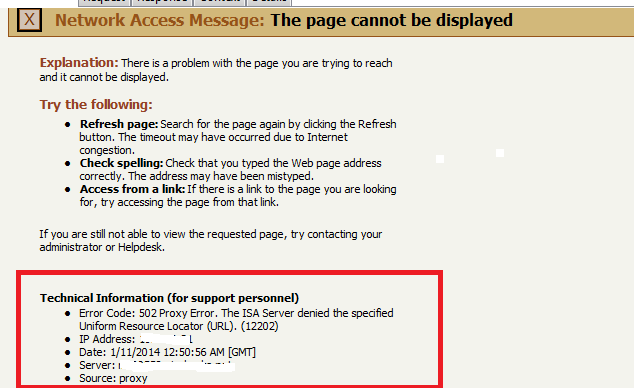
We just upgraded from TFS 2010 to TFS 2013, but we still use the same Build Agent. One interesting part was that after I pushed a new build, some tests failed in TFS build and here was the error message.

Error Code: 502 Proxy Error: The ISA Server denied the specified Uniform Resource Locator


I was not aware of this IP address and this server. After I logged to the Build Agent and used mstest to run one test again, the test still failed. After looking into this issue for a while, here are the steps to fix the build issue.

Open IE and go to Tools > Internet Options > Connections > LAN Settings > Proxy Server > Advanced > Exceptions 

Add IP address and domain name (i.e 10.2.1.5; xxx.domain.com) and apply the changes.


Run the test again or queue a new build. The tests pass in TFS 2013 build.

February 12, 2014

Fixed the issue : The C# Project is targeting .NET Framework, version=v4.5, which is not installed on this machine.

Today I logged in to Windows Server 2008 R2 and downloaded the latest code from TFS 2013. When opening the solution file, I saw the following screenshot error.

Change the target to .NET framework 4.5. You can change back to .NET Framework , version =v4.5 at a later time.


 After looking into this issue, here are my findings:

Another team member is using .NET framework 4.5.1 on his laptop via Visual Studio 2012.

When opening the solution file, for some reason, there is no .NET framework 4.5 for this project in the dropdown on this machine. That explained why I saw this error.


 Forgot that screenshot error,  moved on and used . NET framework 4.5.1 to build the project. It worked perfectly.

February 10, 2014

Turn off unimportant object types when doing database comparison in Visual Studio 2013

When using Visual Studio 2013 to do database comparison between 2 environments (DEV & TEST), I only care about the following things :

1.    Table names are identical.

2.    Table Column names are identical.

3.    Stored Procedures are identical.

However, when using Visual Studio 2013, I can still see something unimportant like users, index and other unrelated object types.  That’s because Visual Studio 2013 turns on these Object Types by default.


Just select Stored Procedures & Tables only and do database comparison again. That’s the information I really want to see.


Please see also:

SQL Server : Database Schema Comparison Tool for Different Environments