Search This Blog

March 23, 2016

Selenium and C#: How to do mouse hover action in Selenium?

Today I wanted to verify the texts. The interesting part is that if I don’t do mouse hover action, Selenium WebDriver can’t return the texts. It returns empty string.

If I use the following code (Action-MoveToElement-Perform ) to do mouse hover action on the account menu in the site, I can verify the texts easily.  

Actions actions = new Actions(driver);
actions.MoveToElement(elementName);
actions.Perform();

Thread.Sleep(1000);

March 17, 2016

Fixed the issue in Selenium: An exception of type OpenQA.Selenium.WebDriverException occurred in WebDriver.dll but was not handled in user code

I am currently working on a new project where I need to write Selenium with C# to do the web automation in Visual Studio 2015.

Today after I rebooted my machine, I noticed that Firefox was removed. Therefore, I installed the new version of Firefox (45.0). After that, when running the tests, it caused the following Firefox Driver error, but it was working yesterday. 


I asked my test lead and he noticed that I installed the new version, but we still need to use Firefox 44.02.  After uninstalling Firefox 45.0 and installing Firefox 44.02, running the tests in Selenium passed.

March 10, 2016

Visual Studio 2015: Use the ordered test to run multiple coded web performance tests at a time.

This week, I installed Visual Studio 2015 update 1. After that, I notice that I can’t run selected tests including coded web performance tests in Test List Editor. I can’t run them in Test Explorer either.

However, In Visual Studio 2013, I can use Test List Editor to run selected tests without any issue (Please see The Feature Is Back- Visual Studio 2013 Can Run Selected Tests in Test List Editor).

In this situation, how do I run multiple coded web performance tests at a time in Visual Studio 2015 IDE directly?

  • In coded web performance tests, I need to add IncludeWebTest in the source code. Right Click on this test and choose "Run Coded Web Performance Test". It will run multiple tests at a time. (Note: this is not what I want because it is not user-friendly and coded web performance tests are not supported in Test Explorer.)
  •  Create a new Load Test that contains many coded web performance tests. (Note: This is not what I want because I don’t want to do the load test before coded web performance tests are working.)

  •  Add a new ordered test that contains many coded web performance tests. This time, I can use Test Explorer to run this order test.(Note: Don’t try to put all tests in one ordered test. We can put several tests in one ordered tests.)


I would say Visual Studio 2015 IDE doesn’t provide good design to run multiple coded web performance tests at a time.

February 15, 2016

How to verify the data accuracy of the EDI 834 file in Parasoft SOAtest?

 In this sprint, we have the new feature where we need to send outbound EDI 834 files to Washington Health Benefit Exchange (WAHBE).

The process is that BizTalk will create the canonical XML files that pass the validation error and then EDI 834 files will be generated automatically.

How to verify the data accuracy in EDI 834 line by line? It is really the challenge in SOAtest. Here is the way.

  • We look for the canonical XML file name in the archive folder.
  • From the Canonical XML file, we can get the EDI file name (Partial)
  • Convert EDI file to XML format

  • In XML Edit, this is the EDI 834 file BizTalk creates and SOAtest converts it to XML format .

  • In XML diff, we parameterize the variables in the elements and then use it to do the data validation with step 4.

  • We don’t need to validate every element in XML tag. We can put XPath in the Ingored Differences. 


From those steps above, it is really easy to validate the data accuracy of EDI 834  in SOAtest.

November 6, 2015

Parasoft SOAtest: Test execution in different environments via Test Configuration

In Parasoft SOAtest, if you have 20 .tst files where your environment reference points to QA environment, after developers push the code to UAT, do you still need to manually change them to UAT 20 times and then do the smoke tests?

Later, if you would like to do regression tests in QA environment again, do you still need to manually change them back 20 times?  

Here is one easy way to handle the scenario above using the Test Configuration in SOAtest.

  • Right click the tst file
  • Click Test Configuration
  • Duplicate the Example Configuration and rename it
  • Click Execution tab
  • Enter the name of environment
  • Close the window


If you want to run the tests in QA environment, just right click the tst files and choose Test Using->User-Defined->QA1. The tests will be run in QA1 perfectly.


November 5, 2015

Fix the issue of EDI 834: the first line contains all of the strings

If you use Notepad ++ to open the EDI 834 file, sometimes the first line contains all of the strings. It is hard to read. If we would like to make it more readable in the normal way, how do we do it?


After talking to our BizTalk developer who works on EDI 834, he mentions one important point: In EDI 834, at the end of each line, you can see ~, which can be used as the line break.


Please follow the following screenshot and use ~\n to replace ~  and you are all set.


November 4, 2015

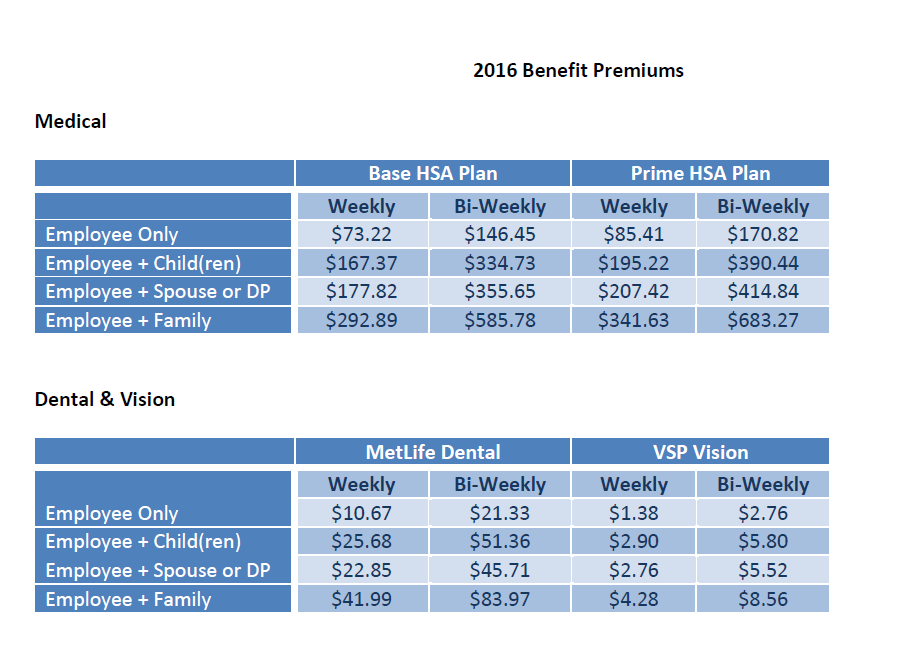
Expensive Manpower HSA plans of 2016

I am a W2 consultant in Manpower (Experis) in WA.  Some colleagues and I complain about the Manpower HSA plans of 2016 because it is really expensive.


After looking into their insurance plans of United Health Care in 2016, I would say the Base HSA plan is really expensive compared to individual plans in WA such as Premera, Lifewise and even United Health Care.

If I compare 2 plans between United Health HSA 6500 (HSA6500) and United Health Care (Base HSA Plan) in Manpower, I get the following result:


For the family size, we need to pay annual premium $15230.28 for Manpower, but the out of pocket is still high. If I shop by myself, I just pay $9,498, but the out of pocket is similar. Paying $5,732 annually gets the similar result. That’s really bad. If I use Premera’s plans, I get the same result. 

If you are W2 consultants in Manpower and you are healthy, plan to have the major surgery or pregnant in 2016, don’t enroll in Manpower’s Plan because you need to pay $15230.28. You can just shop individual plan in Premera , Lifewise or even in the State Exchange . You will save a lot of money.

Everyone says employers sponsor 20-50% of insurance, but in Manpower, I don’t see it at all.

They are trying to let consultants in 50 States pay the same price (bi-weekly). Different State has the different rate of insurance. That’s the common sense.

Manpower, if you expect to hire consultants to work for you,  please make them happy and treat them nicely. 

November 2, 2015

Fixed the issue- Find someone feature in Microsoft Lync 2013 didn't work

Last week, I noticed that when using “Find someone” feature in Microsoft Lync 2013, searching was pending forever and the names were never showing up.  


The interesting part was that when opening MS Outlook 2010, the color of the presence indicator in my name was not green, but it was green in MS Lync 2013. I was still available.


After looking into this issue, just repair Microsoft Lync 2013 in program and features. After the reboot, find someone feature in Microsoft Lync 2013 is working.


October 30, 2015

Fixed the issue of yellow triangle network icon in Windows 7 laptop without local admin right

 I use my windows 7 work laptop to connect to corporate Wi-Fi in the office without any issue. This week I noticed that for some reason, when I connected to Wi-Fi in my home network, it didn’t work. It was connected, but there was no Internet access.  It showed the yellow triangle network icon. However, there is no issue in other devices such as iPhone, iPad, MacBook Pro and another windows 7 laptop.

The main issue in my windows 7 work laptop is that I don’t have the local admin right due to the corporate policy. I can’t look into the issues such as View the property in Network Connection and firewall settings.  


I tried to make it work, but I couldn’t.

  • In device manager, all are looking good.
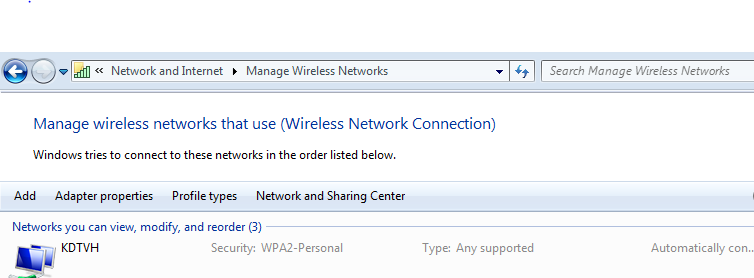
  • In manage wireless network, remove the home network and re-connect to it: it doesn’t work.
  • Restart the router and re-connect to it : it doesn’t work
  • Ipconfig command: it doesn’t work
  • Netstat command : it doesn’t work

Finally, I removed the home network and manually created a network profile. After connecting to Wi-Fi, opening IE to go to google.com is working. 


October 28, 2015

The Parasoft SOAtest 9.9 upgrade means side-by-side installation with SOAtest 9.7

We have used SOAtest since last July. We were told we needed to upgrade SOAtest 9.7 to 9.9. After the installation, we found that it is not really the upgrade. It is called side-by-side installation. SOAtest 9.9 and SOAtest 9.7 are installed together in my laptop.

Here are 2 main issues after the “upgrade”:

  • We need to reconfigure everything in Parasoft->Preferences.

  • If we create new tests in SOAtest 9.9, we can’t use SOAtest 9.7 to expand the test scenarios in the individual .tst file. It is not backward compatible.

Why let users reconfigure the settings in SOAtest after the upgrade? It is not user-friendly.