Search This Blog

August 23, 2014

Fixed the issue: iTunes could not back up iPhone because the backup was corrupt or not compatible with the iPhone

This morning my wife spoke to me that our 2 iPhones are quailed for “iPhone 5 Battery Replacement Program” and told me to back up my iPhone 5 into my laptop via iTunes.

Therefore, I connected my iPhone 5 to Windows 7 laptop, opened iTunes and clicked “Back up now “ button. But  I got the following error message.

iTunes could not back up iPhone because the backup was corrupt or not compatible with the iPhone.
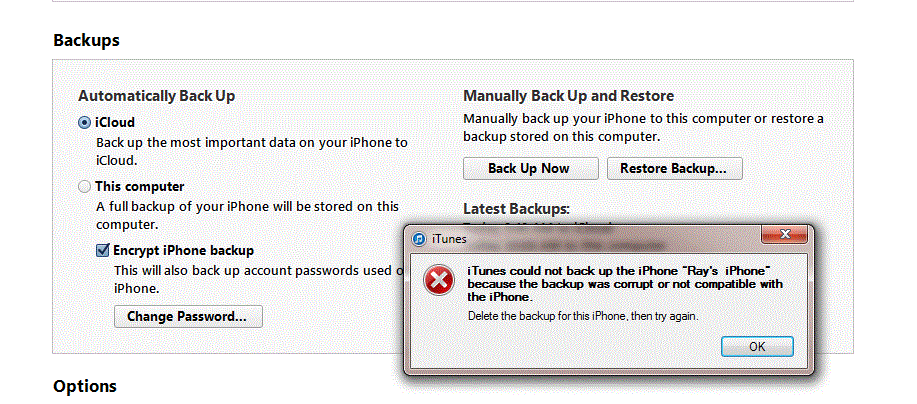

After looking into this issue, here are my steps to fix it.

Close iTunes , disconnect and reconnect iPhone 5 to laptop

Delete the files below the Backup folder

C:\Users\ray\AppData\Roaming\Apple Computer\MobileSync\Backup

Copy the files of video and photos from iPhone 5 to D drive 

Delete all video and photos


Open iTunes , do the backup again and you are all set.

August 19, 2014

WCF Test: Fixed the issue of Zulu Time in Parasoft SOAtest

 If I declare DATE and DATETIME variables, they will display the following date format in SQL Server.  

DECLARE @MyLowDt DATE, @MyHighDt DATETIME

MyLowDt: 2004-02-11
MyHighDt: 2004-02-11 00:00:00.000

In SOAtest, if I get (MyLowDt) DATE variable from SQL query and use it in WCF method, the interesting part is that SOAtest uses Zulu time as an input and never returns the rows I want to see.

MyLowDt: 2004-02-11T08:00:00.000Z  (Zulu Time)

If I get (MyHighDt) DATETIME variable from SQL query and use it in WCF method, SOAtest uses Timestamp with T as an input and can return the rows I want to see.

MyHighDt: 2014-02-11T00:00:00.0

In SQL Server, If I use Zulu time to query the data, I can still get the data back.

Open WCF test Client , input Zulu time and I can get the data back.

But in SOAtest, input Zulu time and I can’t get the data back.

Parasoft  SOAtest, you should make testing life easier. 

August 18, 2014

WCF Test Date Range: Parasoft SOAtest doesn’t return the correct rows in Response Element

Today I found out an interesting issue in Parasoft SOAtest.

Scenario:  Input 2 date fields and one parameter to see if the rows returned from WCF method are correct.

Here is the basic SQL query to get the data where the condition is using 2 different dates. It returns 9 rows and also includes the MinDate.

Field1_name >=’MinDate’ and Field2_name <=’MaxDate’

Open WCF test client, do the same Scenario ,  invoke the WCF method and I get the same result: 9 rows.

What happens to Parasoft SOAtest 9.7?  In SOAtest, double click Traffic View-Traffic Viewer-> Click Request: I see 3 input parameters.

Click Response - >Click Element: I only see 7 rows which do not include the MinDate.

I have the confidence to say my configuration is correct in SOAtest. 

After modifying the following SQL query, all tests in SOAtests pass.

Field1_name >’MinDate’ and Field2_name <=’MaxDate’


Parasoft SOAtest : Fixed the error message- the maximum message size quota for incoming messages (65536) has been exceeded.

Our team is using Parasoft SOAtest to test WCF method. After executing all tests, the following error appears.

Message: The maximum message size quota for incoming messages (65536) has been exceeded. To increase the quota, use the MaxReceivedMessageSize property on the appropriate binding element.

In C# , I know it is easy to adjust MaxReceivedMessageSize in app.config and the issue will be going away.

But in Parasoft SOAtest, how to fix this issue? 


If we change the Default to Custom and uncheck Constrain request to WSDL, the issue is going away.


August 17, 2014

Lessons Learned in Parasoft SOAtest

I have used C# to do the test automation for many years. Currently I am working on the new project. The interest part is that the team uses Parasoft SOAtest to develop automation to test WCF methods. Here are some lessons I learned:

SQL query:

If we put SQL query in txt file, please don’t put any comment (- -) .  At the end of every line, please add more space. Otherwise, SQL query will not work.

Check out:

SOAtest doesn’t integrate with TFS very well. It has the merge issue. Only 1 person can check out one tst file. If 2 persons are working on the same tst file, once A checks in, B will lose his work. Therefore, one tst file is only for one WCF method.

Refresh Issue

If I duplicate set-up test and modify the data source column name in ‘Extraction”, sometimes this column doesn’t appear immediately in SOAP Client. Clicking “refresh” is not working either. I need to close SOATest and reopen it.

Global Variables:

Put the values in the Test Suite instead of putting them in local test scenario. If you put the values in test scenario and when executing all the tests, some variables will get confused and some tests will fail.

When I use this tool to develop test automation, I see so many issues in this product. My colleagues said Parasoft SOAtest costs 1 million dollars and adding one user needs to pay the license fee. 


It is not worth 1 million dollars because Parasoft SOAtest is not the high-quality product after using it.

June 25, 2014

Fixed the issue: Integration test failed due to curly quotes

Last week, when doing integration test with another team member, he mentioned that one row in the inbound table showed the invalid character. After looking into this interesting issue in our DB, here is the screenshot.

How could this issue happen?

If users are typing apostrophe in MS Word or Outlook, it shows the first one above (Curly quote or Smart quote) by default.

If they copy and paste into the system, after we publish the data, the integration test fails due to invalid characters (the second one above)

How to turn off Smart quote and use Straight quotes in MS word? Here are the steps:

Open MS Word 2010 -> File-Options-Proofing-> AutoCorrect Options->AutoFormat As You Type-> Uncheck Straight quotes with smart quotes.


Usually users won't do it in this way. The best way is that we need to validate the data with Curly quote often in the DB.

April 18, 2014

Fixed the issue: Could not start build: You are not authorized to access

This morning, our team members could not queue a new build successfully. We got the following error message. But we can still hit the following URL successfully.


Go to security setting in TFS 2013 Dashboard  and I don’t see any issue at all.

After logging to build machine and restarting the related build services, I got the logon failure .It means the password of TFS build account was expired.

This error message “You are not authorized to access” is really confusing and Microsoft needs to provide the better error message to handle this scenario.

After updating the new password of TFS build account , queuing a new build is always successful. 

April 1, 2014

TFS 2013 Dashboard: Users can’t export work items to MS Excel ( bad design)

Today one colleague would like to export work items to MS Excel in TFS 2013 dashboard and he could not find it. I could not find it, either. It was working in TFS 2010 web access. I only see one option: Send query as an email. 


After posting a question in MSDN forum, I finally notice this feature was removed in TFS 2012.

The company pays so much money to let users use TFS 2013 enterprise version and finally they can’t use the basic function of exporting work items to MS Excel.  What should they do?

I would say it is bad design and not user friendly. 

March 21, 2014

SQL Query: Get the correct Fiscal Year and Quarter

Today I need to compare the data accuracy between 2 tables in SQL Server 2008 R2. There is one interesting scenario of Fiscal Year and Quarter for me to validate. The first quarter of a fiscal year starts on October 1 every year.  

For example,

Q4 (FY 2013): July –September, 2013

Q1 (FY 2014): October -December, 2013

Q2 (FY2014):  January –March, 2014

Q3 (FY2014):  April –June, 2014

Q4 (FY2014):  July –September, 2014

Actually, we can use datapart and case when  in SQL query easily.


After that, here is the expected result. 


March 19, 2014

Fixed the issue: Invalid Column Name appears in SQL Server Management Studio

Today I used SSMS to select  new columns in SQL query and  it showed invalid column Name ‘XXXXX’.  But running the query has no issue at all.


After looking into this interesting issue, it is easy to fix it.


Just click Edit-> Intellisense-> Refresh Local Cache and  you are all set.