Search This Blog

July 26, 2015

Parasoft SOATest issue: Assertion tests still pass when the data returned is all blank in WCF response

Today I find one interesting issue in SOATest tool. Our developers have recently updated the namespaces in the data contracts that support “http”. For example,


Old: <ns1:Addresses xmlns:ns1=www.XXX.Com/member/06/01/2015
New: <ns1:Addresses xmlns:ns1="http://www.XXX.com/member/06/01/2015"

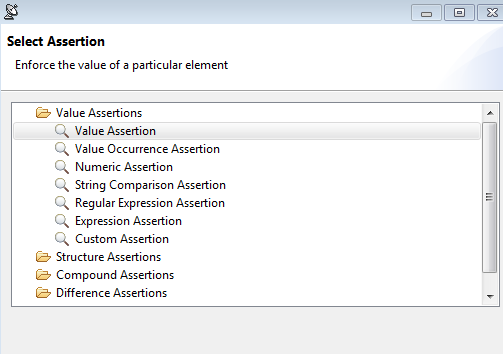
We have so many tests that it is not easy to tell which one has refreshed the WSDL in WCF methods. Our tests are using Value Assertion to validate the data elements in WCF response. After running all tests, all tests passed.

I noticed that in some tests, the data returned was all blank in WCF response. I could not believe that all assertion tests still passed.  That’s really surprising.

After updating WSDL again, the data returned can show all elements in WCF response. 

July 14, 2015

The appraisal tool called CoreLogic ValuePoint4 is not persuasive!

I applied the HELOC in BECU in June and finally noticed that BECU uses CoreLogic’s tool called ValuePoint4. After reviewing the report, I felt very surprised and disappointed.

The comparable sales section is totally not persuasive because all properties are from my neighbors. We bought the houses and moved in between last May and last Sep. We knew sales prices of the houses very well.

A lot of properties have been sold nearby in other communities in 3-6 months. I don’t see them in comparable sales section. What a surprise! This is very basic real estate knowledge. I can't believe CoreLogic does it this way

If the tool itself is not tested well and not persuasive, why give the appraisal report to customers? In my opinion, don’t waste the money to buy this appraisal tool- Core Logic ValuePoint4 .

June 29, 2015

Parasoft SOAtest: Exclude the data of carriage return char (13) in SQL query

Today one test failed in SOAtest. After looking into this one, I noticed that if I invoked one WCF method using the same scenario, it returned the following data in WCF response.

"INSERT\r TEST\r TESET\r \r REASON"

But In SQL server, it showed “INSERT TEST TESET REASON"

That’s because the data contains Carriage Return CHAR (13).


If I add Where [ReasonCode] like '%'+char(13)+'%' in SQL query, I can find the data of Carriage Return.


If I add Where [ReasonCode] not like '%'+char(13)+'%' in SQL query, I can’t  find the data of Carriage Return.


In order to avoid these kind of data, after adding Where [ReasonCode] not like '%'+char(13)+'%' in SQL query, the test passes all the time.

June 3, 2015

How to transfer data from iPhone 5 to iPhone 6 Plus via iTunes?

I got a used iPhone 6 Plus from my wife. If I would like to transfer data from my iPhone 5 to iPhone 6 Plus, here are the easy steps. I transferred the data successfully.

Reset iPhone 6 Plus.

Use USB to connect to iPhone 5 and Windows 7 laptop. It opens iTunes automatically.

Backup data in iPhone 5 first.

Use USB to connect to iPhone 6 plus and Windows 7 laptop.

Follow the instructions in iPhone 6 Plus and do step by step.

You will see Restore from iTunes backup.

Choose the name of iPhone 5 to restore and it takes about 10-20 minutes to transfer the data.

During the credit card setup in Apple Pay, I was not aware that my credit card in my apple account was expired. The setup was not working.  After I updated the credit card in my apple account, it was not working either because iTunes was not smart and didn’t sync well to iPhone 6 Plus.  I skipped the setup and did it later.

Follow the instruction in iPhone 6 Plus again and finally you will see all data is transferred successfully. 

May 28, 2015

TFS 2013: Querying test cases with 2 Tags via OR condition is not working

We create so many test cases. In order to organize them nicely, we add “Tags” in each test case in TFS web dashboard. (Note: I don’t have permission to add tags in MTM, but I do have permission to add tags in TFS web dashboard)
When querying test cases with 2 Tags using OR condition in TFS 2013, I can’t believe it is not working. The query is pending forever and never gets the result back. It is not working in TFS Web dashboard, either.

When querying in MTM 2013 using the same condition, it shows the following error. 

I would say querying 1 tag is always working, but querying test cases with 2 Tags via OR condition is not working in TFS , TFS web dashboard and MTM. It is the known issue after I filed a bug to Microsoft Connect.

Fixed the presence unknown issue in MS Outlook 2010 after the upgrade from MS Office Communicator 2007 to MS Lync 2013

This week, our IT department was doing the upgrade from Microsoft Office Communicator 2007 R2 to Microsoft Lync 2013. After the upgrade, I noticed that the presence status in Microsoft Outlook 2010 showed “Unknown”.
After looking into this interesting issue, I noticed that upgrade means install because Microsoft Lync and Microsoft Office communicator appear in Programs and Features. But Office Communicator 2007 is turned off in Startup program.
How to fix the unknown status issue?
In Search dialog box, enter regedit.
Go to HKEY_CURRENT_USER\Software\IM Providers.
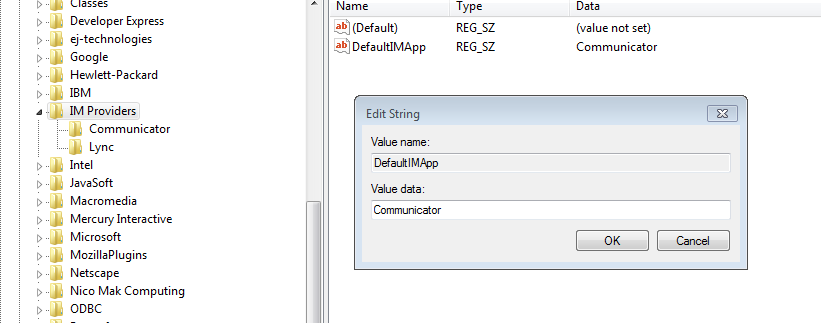
Click DefaultIMApp and it shows Communicator. Change it to Lync.


Go to HKEY_CURRENT_USER\Software\IM Providers\Lync.
Add a new DWORD (32-bit) value and name is UpAndRunning. Set Value data = 2 (Hexadecimal).


Go to HKEY_CURRENT_USER\Software\IM Providers\Communicator. In UpAndRunning, set Value data = 0 (Hexadecimal). (Note: this is optional if your office communicator is not launched automatically)

After rebooting the laptop, the presence status appears in MS Outlook 2010.

May 22, 2015

License issue: don’t use “Testers” field in MTM.

2 weeks ago my manager talked to me that we created so many test cases for Release 1, but all “Testers” are showing your name!  I replied: That’s because "AssignedTo" and "Testers" are different.  I use “Assigned to” field in TFS and MTM all the time.
When viewing test cases in TFS, we only see “AssignedTo “as follows:


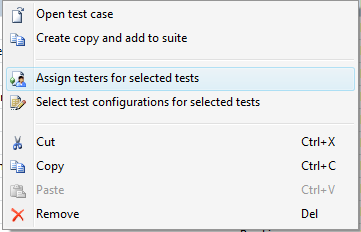
Can you change the name in “Testers” field in TFS? The answer is NO in TFS because there is no “Testers” field . But you can change it in MTM. Click one test case, right click and choose “assign testers to select for selected tests”

You can also change it in TFS Web dashboard once you have the license to see the test suites inside the Test tab. But I heard it costs more than $ 2,000 per person. Is it worth it?  If you don’t have the license of installing MTM, you can’t change “Testers” either.


In the project team, only testers care about test case creation and execution. Who cares about how many test suites you have in Test tab? They only care about the tasks assigned to testers in each sprint.

From my experience, testers can sit down with business analysts and developers to go through test cases to see if there is something missing, but they are not interested in testers’ work. The project team only cares about the final test result.

Due to license issue, not all people in the project team can view test suites inside the “Test” tab in TFS Web dashboard. If the budget is limited in your project team, I don’t see any value using “Testers” field in this case.
May 21, 2015

Fixe the issue in Parasoft SOAtest: Message: Could not find endpoint in client configuration file

In SOATest, we have the configuration file called Environments.env where we store environment variables. When running my BVTs today, some of them failed.
I notice that our team added a new path (/BusinessService ) in the URL. After updating it in Environments.env and running BVTs again, I saw the following error message. Closing and reopening SOAtest still could not solve the issue.
Could not find endpoint in client configuration file: WCF URL

After looking into this interesting issue, I notice “Constrain request to WSDL” in some tests was checked. After unchecking it and running BVTs again, all tests passed.

February 24, 2015

Parasoft SOAtest: Fixed the issue of line feed character ( )

Today one test failed in SOAtest due to feed character (&#10). In SOAtest, if I get customer data from SQL server , the data appears in Result As XML -> Edit and it shows the following data.
<LastName>Lin&#10</LastName>

&#10 is line feed character and it is not visible in SQL Server. I can use LEN(LAST_ NAME) to know how many characters in this field. 

How to avoid the issue of line feed character and carriage return using SQL query? After using the following one, the test passed in SOAtest. 
RTRIM(replace(replace(LAST_NAME,char(10),' '),char(13),' ')) LastName

January 15, 2015

Parasoft SOAtest 9.7 doesn’t support Common Table Expression (CTE) in SQL Server 2008 R2

If you have the following SQL query that uses Common Table Expression (CTE), you will see the error after trying to populate the data in SOAtest.
  
DECLARE @PolicyName varchar(20)='%Glucose%'
; WITH CTE as
(
  SELECT field1, field2
  from Policy PO  WITH(NOLOCK)
  WHERE field1 like @PolicyName
)

The following error shows up in XML data bank after running the test.

com.microsoft.sqlserver.jdbc.SQLServerException: Must declare the scalar variable "@PolicyName".

When I see this error, I feel so surprised because this SQL query is always working in SQL Server 2008 R2, but SOAtest complains about it using CTE.

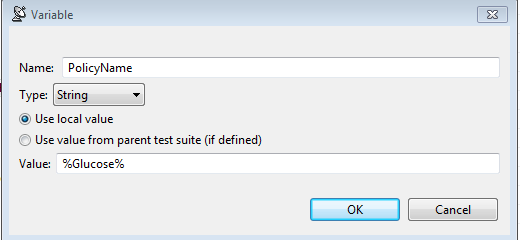
How to solve this issue?  We need to declare this variable in SOAtest.

  1. Double Click Scenario
  2. Click Variables and add PolicyName like this

    3.Modify the following SQL query

; WITH CTE as
(
  SELECT field1, field2
  from Policy PO  WITH(NOLOCK)
  WHERE field1 like '${PolicyName}’
)


After running the test, the variable will be passed to SQL query in CTE and the test will pass without any issue.