Search This Blog

September 26, 2014

Need to reconfigure all settings in SOAtest after TFS 2013 upgrade

Our IT department was doing TFS 2013 upgrade last weekend.  After TFS 2013 upgrade, our team saw some issues of SOAtest this week.

When opening SOAtest, I lost the connection to TFS and it showed the error message all the time.

Another team member could connect to TFS in SOAtest , but she could not get the latest version on the project level because “Get Latest version” or “Get Specific Version” was disabled. The interesting part was that she could still get the latest version in the individual tst file. But that was not helpful.

We need to fix this issue as soon as possible. Therefore, the best way to fix this issue is to create a workspace, import all test cases from TFS and reconfigure the settings. Here are the simple steps:

1)    Create a folder in C drive.

2)    Open SOAtest and use that folder as a workspace.

3)    Click file ->import and I can import all test cases from TFS.

4)    Click Parasoft->Preferences and reconfigure all required settings .

5)    Run BVTs and validate if all tests pass.


Another member mentioned that after TFS 2013 upgrade, if we used SOAtest to reconnect to TFS 2013, we should not be able to see the issues above. I totally agreed. 

Why bother testers to reconfigure all settings in SOAtest after TFS 2013 upgrade? 

September 22, 2014

Parasoft SOAtest issue: the characters after & are truncated in Traffic Viewer-Response- Element

This morning I noticed one test failed in SOAtest. After looking into this issue, I have the confidence to say this is the bug on SOAtest side.

We have the SQL query to get the test data and then pass the data in WCF method.

SQL query:

@Name VARCHAR (100)

….Where RTRIM (Name) like '%&%' (Initially we didn’t have this condition .I added it.)

Test Data:

It contains “&” . For example, Name is Ray FURNITURE & EQUIPMENT

SOAtest (DB tool)

Click Traffic Object -> Traffic Viewer-Response-Literal

Ray FURNITURE & EQUIPMENT

Click Traffic Object -> Traffic Viewer-Response-Tree

It doesn’t show the tree nodes. It only shows NewElement.


Click Traffic Object -> Traffic Viewer-Response- Element

results:
  resultSet:
    rows:
      row:
        Name: Ray FURNITURE

I used different data with & several times and I noticed that the result only showed the characters before &. I believe the characters behind & were truncated in SOAtest.

I used different data without & several times and the complete data appeared.


Next time if you see this & issue, don’t feel surprised in SOAtest.

September 19, 2014

Fixed SQL Query: Adding Group By When Using ROW_NUMBER ( )

If we have ROW_NUMBER ( )  in SQL query, using SELECT DISTINCT shows the duplicate record.

SQL query

SELECT DISTINCT
COL1 AS ID,
ROW_NUMBER( ) OVER( ORDER BY COL1) AS RowNum,
COL2 AS FirstName
FROM table
INNER JOIN table ON xx=xx
WHERE ...

Result:


How can I remove the duplicate record when using ROW_NUMBER( ) in SQL query? The answer is to use Group By.

Modify SQL query: adding Group By
SELECT
COL1 AS ID,
ROW_NUMBER( ) OVER( ORDER BY COL1) AS RowNum,
COL2 AS FirstName
FROM table
INNER JOIN table ON xx=xx
WHERE ...
GROUP BY COL1, COL2

Result:

September 15, 2014

Fixed the issue- Order by string ( 1,11,2,21,3), not by number (1,2,3,4)

Today I ran the SOAtest and found one test failed.I checked the SQL query and it used 
Order by FieldName. The data is returned as follows (order by string)

1149
1180
1339
135
1365
140
23
.....

When I opened WCF test client and invoked the web service, it returned the following data (order by number)

23
53
60
78
135
140
271
292
453
.....

After looking into this interesting issue, I modified the following SQL query and it is working perfectly.


Order by FieldName *1

August 28, 2014

Fixed the issue in SQL Server 2008- Conversion failed when converting date and/or time from character string.

Today when I executed one SQL query, sometimes it worked, but sometimes it didn’t. It showed the following error:

Conversion failed when converting date and/or time from character string.

After looking into this interesting issue, I found the SQL query used

CONVERT(char(20),FieldDateName,127)

In SQL Server 2008, it is better to use CAST and Datetime2 Type. After using the following way, the error disappeared.

CAST(FieldDateName as Datetime2)

August 27, 2014

WCF: Skip Take Sort in SQL Server 2008

In WCF method, we have an interesting feature called Skip Take Sort.

If we input one member ID, skip=30, take= 40, sort by one Field name and then consume the WCF , the data for that member returned will skip first 30 rows and take the next 40 rows after a sort. 

How can I do it in SQL query? Here is the simple example : Skip 1 and Take 3 after a sort.. It is working perfectly.


August 23, 2014

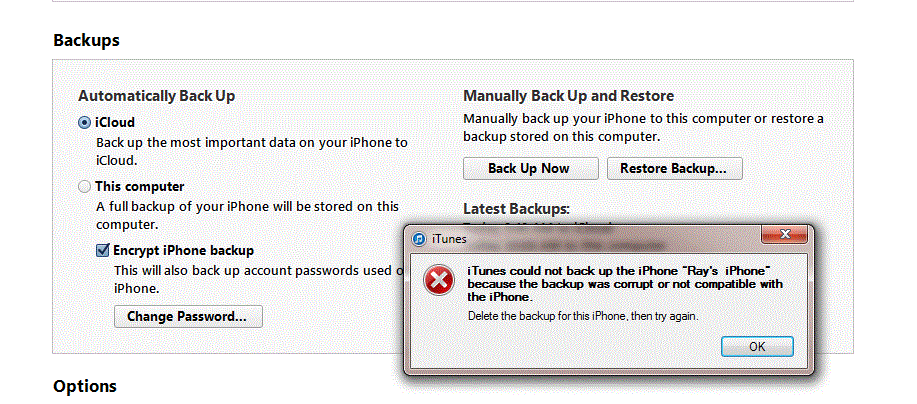
Fixed the issue: iTunes could not back up iPhone because the backup was corrupt or not compatible with the iPhone

This morning my wife spoke to me that our 2 iPhones are quailed for “iPhone 5 Battery Replacement Program” and told me to back up my iPhone 5 into my laptop via iTunes.

Therefore, I connected my iPhone 5 to Windows 7 laptop, opened iTunes and clicked “Back up now “ button. But  I got the following error message.

iTunes could not back up iPhone because the backup was corrupt or not compatible with the iPhone.


After looking into this issue, here are my steps to fix it.

Close iTunes , disconnect and reconnect iPhone 5 to laptop

Delete the files below the Backup folder

C:\Users\ray\AppData\Roaming\Apple Computer\MobileSync\Backup

Copy the files of video and photos from iPhone 5 to D drive 

Delete all video and photos


Open iTunes , do the backup again and you are all set.

August 19, 2014

WCF Test: Fixed the issue of Zulu Time in Parasoft SOAtest

 If I declare DATE and DATETIME variables, they will display the following date format in SQL Server.  

DECLARE @MyLowDt DATE, @MyHighDt DATETIME

MyLowDt: 2004-02-11
MyHighDt: 2004-02-11 00:00:00.000

In SOAtest, if I get (MyLowDt) DATE variable from SQL query and use it in WCF method, the interesting part is that SOAtest uses Zulu time as an input and never returns the rows I want to see.

MyLowDt: 2004-02-11T08:00:00.000Z  (Zulu Time)

If I get (MyHighDt) DATETIME variable from SQL query and use it in WCF method, SOAtest uses Timestamp with T as an input and can return the rows I want to see.

MyHighDt: 2014-02-11T00:00:00.0

In SQL Server, If I use Zulu time to query the data, I can still get the data back.

Open WCF test Client , input Zulu time and I can get the data back.

But in SOAtest, input Zulu time and I can’t get the data back.

Parasoft  SOAtest, you should make testing life easier. 

August 18, 2014

WCF Test Date Range: Parasoft SOAtest doesn’t return the correct rows in Response Element

Today I found out an interesting issue in Parasoft SOAtest.

Scenario:  Input 2 date fields and one parameter to see if the rows returned from WCF method are correct.

Here is the basic SQL query to get the data where the condition is using 2 different dates. It returns 9 rows and also includes the MinDate.

Field1_name >=’MinDate’ and Field2_name <=’MaxDate’

Open WCF test client, do the same Scenario ,  invoke the WCF method and I get the same result: 9 rows.

What happens to Parasoft SOAtest 9.7?  In SOAtest, double click Traffic View-Traffic Viewer-> Click Request: I see 3 input parameters.

Click Response - >Click Element: I only see 7 rows which do not include the MinDate.

I have the confidence to say my configuration is correct in SOAtest. 

After modifying the following SQL query, all tests in SOAtests pass.

Field1_name >’MinDate’ and Field2_name <=’MaxDate’


Parasoft SOAtest : Fixed the error message- the maximum message size quota for incoming messages (65536) has been exceeded.

Our team is using Parasoft SOAtest to test WCF method. After executing all tests, the following error appears.

Message: The maximum message size quota for incoming messages (65536) has been exceeded. To increase the quota, use the MaxReceivedMessageSize property on the appropriate binding element.

In C# , I know it is easy to adjust MaxReceivedMessageSize in app.config and the issue will be going away.

But in Parasoft SOAtest, how to fix this issue? 


If we change the Default to Custom and uncheck Constrain request to WSDL, the issue is going away.