Search This Blog

February 24, 2015

Parasoft SOAtest: Fixed the issue of line feed character ( )

Today one test failed in SOAtest due to feed character (&#10). In SOAtest, if I get customer data from SQL server , the data appears in Result As XML -> Edit and it shows the following data.
<LastName>Lin&#10</LastName>

&#10 is line feed character and it is not visible in SQL Server. I can use LEN(LAST_ NAME) to know how many characters in this field. 

How to avoid the issue of line feed character and carriage return using SQL query? After using the following one, the test passed in SOAtest. 
RTRIM(replace(replace(LAST_NAME,char(10),' '),char(13),' ')) LastName

January 15, 2015

Parasoft SOAtest 9.7 doesn’t support Common Table Expression (CTE) in SQL Server 2008 R2

If you have the following SQL query that uses Common Table Expression (CTE), you will see the error after trying to populate the data in SOAtest.
  
DECLARE @PolicyName varchar(20)='%Glucose%'
; WITH CTE as
(
  SELECT field1, field2
  from Policy PO  WITH(NOLOCK)
  WHERE field1 like @PolicyName
)

The following error shows up in XML data bank after running the test.

com.microsoft.sqlserver.jdbc.SQLServerException: Must declare the scalar variable "@PolicyName".

When I see this error, I feel so surprised because this SQL query is always working in SQL Server 2008 R2, but SOAtest complains about it using CTE.

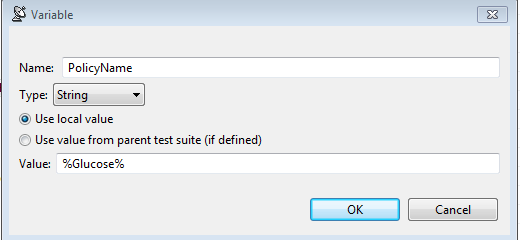
How to solve this issue?  We need to declare this variable in SOAtest.

  1. Double Click Scenario
  2. Click Variables and add PolicyName like this

    3.Modify the following SQL query

; WITH CTE as
(
  SELECT field1, field2
  from Policy PO  WITH(NOLOCK)
  WHERE field1 like '${PolicyName}’
)


After running the test, the variable will be passed to SQL query in CTE and the test will pass without any issue.

November 26, 2014

Fixed the X.509 Certificate issue in WCF Test Client -The client certificate is not provided. Specify a client certificate in ClientCredentials

In our current project, we implemented X.509 Certificates. In order to test WCF methods, we needed to install X.509 certificates in our laptop. But when using SOAtest to run the tests or using WCF test client to invoke all methods, the following error message appeared:

The client certificate is not provided. Specify a client certificate in ClientCredentials.


How do we fix this issue in WCF Test Client? I assume you have the console app with the X.509 Cert configuration in app.config and the unit tests are working. 

Here are the steps to configure the WCF test client.

  1. Open WCF Test Client.
  2. Go to C:\Users\ray\AppData\Local\Temp\Test Client Projects\12.0.
  3. Open Client.dll.config.
  4. Copy all the contents of app.config into Client.dll.config and click save.
  5. WCF test client will be refreshed and make sure you don’t see any error in Client.dll.config (Modify Contract name if required).
  6. All WCF methods appear.
Input the parameters to invoke one WCF method and it is working without any certificate issue.

Fixed the vsmdi issue : Root element is missing in Visual Studio 2013

Today I used my .vsmdi in Visual Studio 2013 to run unit tests, and I got the following error.

Error loading C:\TestProject\Test\Test.vsmdi: Root element is missing.

After looking into this issue, for some reason, it was empty in the .vsmdi file.

After adding the following elements in vsmdi and running the tests again, the error was going away.

November 24, 2014

Fixed the WCF issue: When the third digit of Milliseconds is 0, it doesn’t appear In WCF response format

Today one test failed in SOAtest. After looking into this interesting issue, we noticed that it was related to Milliseconds with 2 or 3 digits in WCF response format.

  2014-11-14T16:12:01.107

  2014-11-05T12:01:07.43

In DB, when using the SQL query of RTRIM(CONVERT(char(25),FieldName,127)), I could see Milliseconds with 3 digits all the time:

2014-11-14T16:12:01.107

2014-11-05T12:01:07.430


It means in WCF response format, when the third digit is 0, it is ignored and does not appear. It makes our verification test failed.

The quick workaround to fix this issue is to use Case When in SQL query.

After adding this condition in SQL query, all tests in SOAtest pass without any issue.

(CASE WHEN (CONVERT(char(25),FieldName,127) LIKE '%0')  
      THEN RTRIM(CONVERT(char(22), FieldName,127))
      ELSE RTRIM(CONVERT(char(25), FieldName,127))
 ENDAS RequestDate


November 3, 2014

Fixed the battery issue: 0% available (plugged in, not charging)

Last night I noticed that my personal laptop had the battery issue. It showed 0% available (plugged in, not charging). When it was plugged out, it shut down immediately.

After looking into this interesting issue, here are my ways to fix it.

Go to Device Manager-> Uninstall Microsoft ACPI-Compliant Control Method Battery.


Shut down the laptop. Take out the battery about 10-20 seconds. Put the battery back.


Turn on the laptop, go to Device Manager and in Action tab, click Scan for hardware changes and you are all set. 

October 30, 2014

Parasoft SOAtest: Fixed the issue of WCF: Content Type application/soap+xml; charset=utf-8 was not supported.

Today we had the new deployment to Test Environment. After the deployment, running tests via SOAtest showed the following error.

Message: Content Type application/soap+xml; charset=utf-8 was not supported by service http://xxxxxxxx.svc.  The client and service bindings may be mismatched.

Since we didn’t have any change in data contract in WCF, I needed to know what caused this issue. I tried the following ways.

Updated WSDL : the error still appeared.

Service Account: this one had the issue. After we fixed it, the error still appeared.

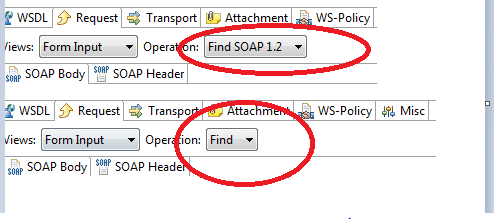
I  added one SOAP Client and added the URL. This time I got the different SOAP version. It just showed “Find” , not Find SOAP 1.2.  That explained why I saw the error message above.


Our Developer noticed that Bindings section was missing in web.config compared to the last build. After adding it and deploying to Test environment again, the error message above was gone.


October 22, 2014

Parasoft SOAtest: Change the default lock level to Check Out- Prevent other users from checking out and checking in

SOAtest doesn’t integrate with TFS very well and it has the merge issue. Only 1 person can check out one tst file. If 2 persons are working on the same tst file, once A checks in, B will lose his work. In this situation, when we check out the tst file,  we always select lock type- Check Out- Prevent other users from checking out and checking in.


However, the lock type of unchanged-Keep any existing lock is showing up by default. How can we change it to what we want? Here are the easy steps:  

Launch SOAtest-> Click Window->Preference->Team-Team Foundation Server->Source Control-> Choose Check Out- Prevent other users from checking out and checking in.


Next time if you would like to check out the tst file, it will show up by default .

October 16, 2014

SOAtest: Environments setting is below Test (.tst) [bad design]

In Parasoft SOAtest , if I create 1 Test (.tst) file , Environment is added below the .tst file automatically. I can switch to another environment (DEV, TEST, UAT..)  manually. What if I have 10 .tst files? It means that I have 10 environments.


If our developers change the data contracts in some WCF methods and I need to do regression tests in DEV environment first. In this situation, I need to manually change 10 times to point to DEV from TEST. After testing in DEV and we push a new build to TEST, I need to change 10 times back to TEST again.

Why not have a global environment where we can change it one time only?  I would say Environments setting below Test (.tst) is the bad design.


SOAtest, you should make your own product more user-friendly. 

October 10, 2014

Fixed the issue in SOAtest: Element could not be located or did not contain text content.

In SOAtest, I always select Value Assertion from XML Assertor to validate the data accuracy in WCF response format. Recently I have seen the following error message very often. For example,

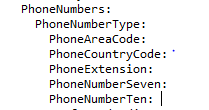
Element "../PhoneNumberTen" could not be located or did not contain text content.

If I Click “Evaluate XPath” button, “No nodes found” message appears.


If I view the response data in the Traffic Viewer, PhoneNumberTen is blank. It means when the value is blank, SOAtest regards it as “No nodes found”.


Because the data is dynamic from SQL Server, it is possible to make the test failed due to the issue above. How do I fix this issue?

Add a new Conditional Assertion and use the following condition.

If Has Children Assertion = true

Then validate the value of PhoneNumberTen


It means when the data is blank, the validation will be ignored. 

After using this condition above, the tests pass!